


iExit Interstate Exit Guide
3.9469.00 Reviews
App Specs
- Version
- 5.5.4
- Updated On
- License
- Free
- Downloads
- 500,000+
- Developer
- iExit Software
- Categories
- Travel & Local
- Platform
- Android
Screenshots
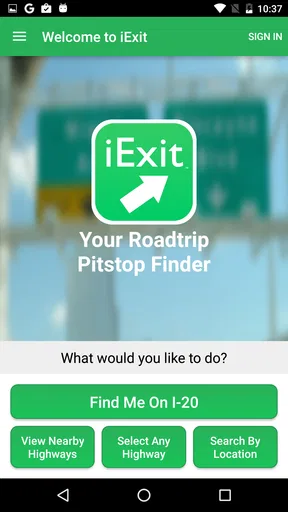
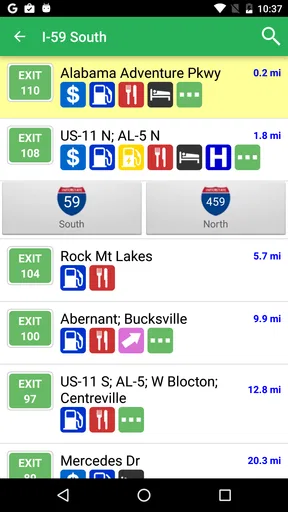
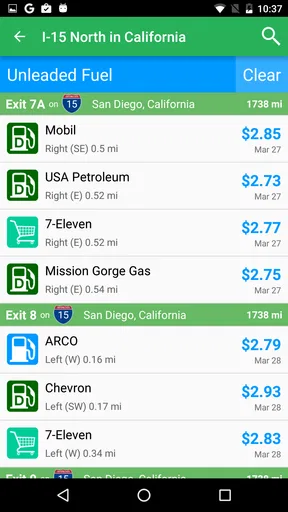
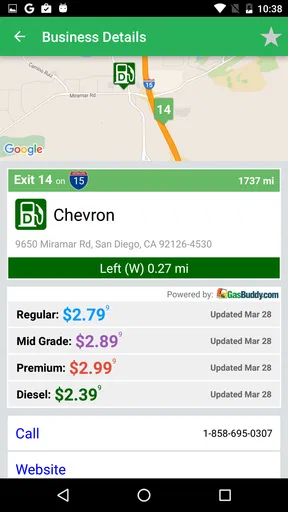
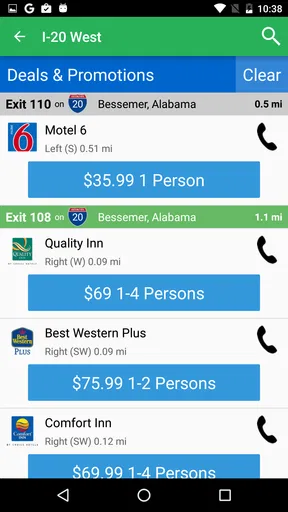
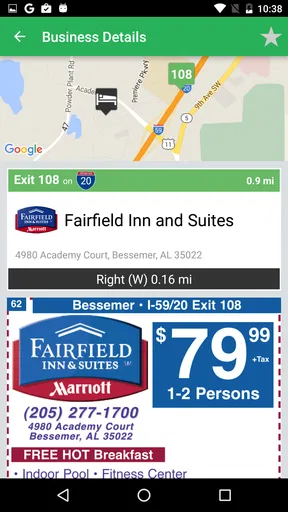
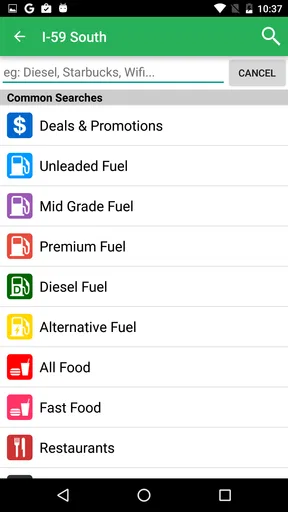
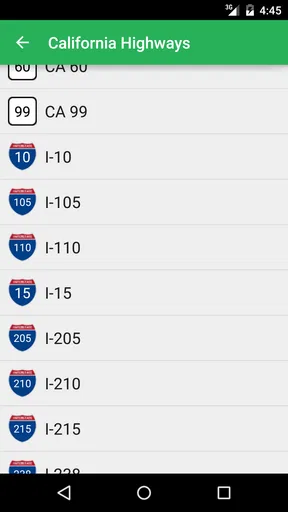
 Analysis by AppCompare
Long interstate drives are rarely difficult because of the driving itself. The harder part is deciding whether to stop now, wait for a better exit, or risk passing a useful service while trying to avoid a last-minute lane change. iExit Interstate Exit Guide is built around that decision. It is a free Travel & Local app from iExit Software that helps me look ahead on the interstate rather than discovering every option only after I have already committed to an exit.
I find its value easiest to understand when I treat it as a planning companion, not as a complete navigation replacement. A normal map app is excellent at taking me from one address to another. This app focuses on the sequence of interstate exits and the practical question behind a long journey: what will be available at the next few chances to leave the highway? That narrower purpose makes it useful for road trips, family travel, fuel planning, meal stops, and anyone who dislikes making decisions under pressure.
How I judge an interstate exit guide before relying on it
For this type of app, I care about three things first. Can I understand the information quickly while stopped safely? Does it help me plan far enough ahead to choose between several exits? And does it complement my usual navigation rather than forcing me to abandon the tools I already know? iExit makes the strongest case when the answer to all three is yes.
The app has been available since March 26, 2013, and its current version is 5.5.4. That long presence matters to me because an interstate guide is most useful when it feels like a familiar travel utility rather than a novelty I have to learn from scratch on every trip. It is rated for Everyone, costs nothing to download, and works on Android 7.0 or later. Those details make it approachable for a broad range of travelers, including people using an older phone for navigation.
Its audience is also visible in its scale: the app has passed 500K installs and holds an average rating of 3.9 from around 1K ratings, alongside 469 written reviews. I would read that as a sign of practical usefulness with some room for personal preference and occasional friction, not as proof that it will suit every driver. A road-trip utility can be genuinely helpful while still depending heavily on the route, the phone, and the quality of the information shown for a particular area.
My first decision rule is simple: use it before the vehicle is moving. I would check the upcoming stretch when planning a break, then use the information as a reminder rather than reaching for the phone at highway speed. The app solves a planning problem; it should not create a distraction problem.
The everyday problem it solves better than a normal map
Imagine leaving after work for a several-hour drive with a child in the back seat and a fuel gauge that is no longer comfortably full. A standard map can find gas stations or restaurants, but the search often begins with a vague question: what is near the route right now? iExit starts from a more useful road-trip question: which upcoming interstate exit gives me the kind of stop I need?
Worth Reading Before You Choose

EA SPORTS FC Mobile 26 Is a Bigger Football Game, but It Takes Time

Flipboard Shows What News Apps Must Do Beyond the Feed

Switching to Android Auto Means Rethinking Your Driving Routine

Google Calendar Makes a Crowded Week Easier to Manage

Ludo King Makes the Most of the Minutes Between Plans

Baby Panda World Brings Quick Play to Modern Phones, but Its Game Library Feels Busy
That difference changes the workflow. Instead of waiting until hunger or fatigue becomes urgent, I can scan ahead while parked, identify a reasonable stopping point, and keep driving with a plan. If the first option looks crowded or inconvenient, I can compare it with a later exit before I am forced into a rushed choice. For me, that is the app’s most convincing use case: reducing uncertainty several miles before the decision becomes immediate.
It is particularly handy when the traveler has competing needs. One person may want food, another may need a restroom, and the driver may prefer fuel or a short break. Looking at exits as a sequence makes those needs easier to balance than searching for a single place in isolation. I can choose an exit that serves the group reasonably well instead of stopping at the first visible sign.
Where the focused design gives iExit an advantage
The strongest feature is not a flashy tool; it is the interstate-centered way of organizing a journey. The app is designed around what lies ahead, so it fits the rhythm of highway driving better than a general-purpose map search. I do not have to begin with a business name or an exact address. I can begin with the road and the next decision.
That focus is valuable when I am comparing exits rather than searching for a destination. A map app may show a dense collection of nearby places, but density can be a weakness on a long drive. Too many pins make it difficult to see which option is actually convenient from the highway. An exit guide narrows the question to the places associated with leaving the interstate, which is closer to how I make decisions during a road trip.
Another strength is advance planning. I can use the app before a trip to think through likely breaks, then check it again during a safe stop if plans change. This two-stage workflow is more useful than treating the app as something I open only when the fuel light is already on. My practical tip is to make a rough stop plan early, but keep one later option in reserve. That preserves flexibility if traffic, appetite, or passenger needs change.
The best use of iExit is proactive planning, not emergency searching. When I use it ten or fifteen minutes before I need a stop, I have time to compare choices and position the vehicle safely. When I wait until the last moment, no exit guide can remove the pressure created by fatigue, traffic, or a missed turn.
Small workflow choices that make it more useful
I would divide a long trip into decision windows. Before departure, I check the broad route and note where a meal, fuel stop, or rest break might make sense. At a planned stop, I look ahead again rather than assuming the next exit will be equally convenient. This prevents a common mistake: using one early search result as if it describes the entire remaining journey.
I also prefer choosing by need rather than by brand or impulse. If the priority is a quick restroom break, I look for the simplest suitable exit. If the group wants a proper meal, I allow more time and consider whether the next exit offers a better combination of food and fuel. The app is more effective when I use it to compare practical outcomes, not merely to collect names of businesses.
A second non-obvious advantage is reduced mental switching. Without an exit-focused tool, I may alternate between navigation, web searches, and roadside signs. Each switch asks me to reinterpret the route. With iExit as a dedicated reference, I can keep the route in my navigation app and use the exit guide for the separate question of what is coming up. That division of labor is cleaner, especially on unfamiliar interstates.
There is also a useful trade-off in planning for passengers. A passenger can review upcoming options while the driver concentrates on traffic. If I am traveling alone, I would do that review only while parked. The app’s usefulness depends as much on disciplined timing as on the information itself, so I would never treat quick access as permission to interact with the phone while driving.
Where a regular navigation app may be the better tool
iExit is not the right first choice when the trip is mainly about door-to-door directions. If I need to reach a specific hotel, find a precise address, understand a complicated urban interchange, or receive turn-by-turn guidance to a destination, I would use a conventional navigation app. Those tools are built for route calculation and arrival, while iExit is built for interstate-stop awareness.
I would also choose a general map when the best stop is not close to an interstate exit. A local café, scenic viewpoint, pharmacy, or small business may be worth a short detour, and a map is usually the better instrument for judging that detour. iExit’s focused perspective is an advantage only when the highway exit itself is the organizing point.
Search engines and map apps can also be preferable when I need current context about a specific place, such as opening information, directions to the entrance, or user comments. I would not ask an exit guide to replace that broader research. Instead, I would use it to identify the exits worth investigating, then confirm the final details with the navigation or map tool I already trust.
There is a similar limitation for travelers who rarely use interstates. If most of my driving is local, the app’s central idea may not earn a place on my phone. Its value grows with the length and structure of the highway journey. Someone who takes occasional short trips may find a familiar map app simpler because it already covers the few searches they need.
What may feel less convenient in real use
The focused design can feel restrictive if I expect one app to handle every travel question. I still need my normal navigation for the route itself, and I may need another source when I want detailed information about a particular business or a detour. That means iExit works best as part of a small travel toolkit rather than as a single replacement for everything.
There is also a human limitation: an exit can look suitable on paper but be inconvenient in practice. Traffic, construction, parking difficulty, a crowded restaurant, or a long turn back toward the highway can change the experience. I treat the app’s information as a planning aid, not a guarantee that every stop will match my expectations.
Another point is the possibility of outdated expectations. Any directory-style travel information can become less useful when a business changes, closes, or alters its hours. I would avoid building a rigid fuel or meal plan around one location. A better approach is to identify two reasonable exits and keep enough fuel, time, and patience to choose between them.
The 3.9 average rating suggests a generally workable experience rather than universal enthusiasm. That feels believable for a utility whose usefulness varies by route and personal habits. Some drivers will appreciate the focused interstate view immediately; others will see it as an extra app beside a map that already does enough. I would judge it by how often I make highway-stop decisions, not by the rating alone.
The real cost of switching to a dedicated exit guide
Because the app is free, the main cost is not financial. It is attention and setup. I need to remember which app answers which question, learn its presentation, and avoid opening it at unsafe moments. If I already have a comfortable routine with a navigation app, adding another tool only makes sense if interstate stops are a recurring source of stress.
The switch is easier when I give iExit a defined job. I would not replace my navigation app. I would use the regular map for the route, use iExit to preview upcoming exits, and use the map again for final guidance after choosing where to stop. This three-part workflow avoids overlap and keeps each tool focused on what it does best.
For families, the transition may be worthwhile because the passenger can help with planning. For solo drivers, the benefit is strongest before departure and during scheduled breaks. For professional drivers or frequent interstate travelers, the time saved from making calmer decisions may justify keeping a dedicated exit reference available, although I would still maintain a backup method for navigation.
Compatibility is reasonably broad for Android users because the app supports Android 7.0 and newer systems. I would still install and test it before a major trip rather than downloading it at the roadside. A short test on a familiar route lets me decide whether the layout and information fit my habits, and it avoids learning the workflow when I am already tired.
Who should install it, and who should skip it
I recommend iExit to drivers who regularly travel long interstate stretches and want to decide on stops before the next sign appears. It is especially suitable for families, road-trip planners, people managing fuel and meal timing, and travelers who dislike searching through a crowded map while trying to remain on schedule.
I would be more selective for someone who drives mostly in cities, rarely leaves the local area, or wants a single app for exact navigation, business research, and detour planning. That person may be happier with a general map tool. I would also skip relying on it alone for a trip where precise arrival guidance, live route changes, or detailed local discovery matters more than interstate exit planning.
My recommendation is to try it as a companion rather than making a dramatic switch. Plan one familiar highway journey with it, compare its exit-based view with the way you normally search, and notice whether it reduces last-minute decisions. If it does, the free price makes keeping it available an easy choice. If it merely duplicates searches you already handle comfortably, there is little reason to force it into your routine.
My final recommendation for long highway drives
After using it as a decision aid, I see iExit Software’s app as a specialized tool with a clear purpose. It does not need to replace a full navigation system to be valuable. Its job is to make the next interstate stop easier to anticipate, compare, and choose.
I like it most when I am planning ahead, traveling with other people, or trying to avoid the familiar cycle of waiting too long and then accepting the first exit available. I am less convinced when the journey requires detailed local exploration or precise destination guidance. That boundary is important: the app is useful because it stays focused, and that same focus limits it outside interstate travel.
For a free app in the Travel & Local category, with an Everyone age rating and a long-running presence on Android, it is a sensible addition to a road-trip setup. My clear advice is to install it if upcoming exits are a recurring part of your travel decisions, test it before a major journey, and pair it with your usual navigation app. Used that way, iExit Interstate Exit Guide earns its place by helping me make calmer choices before the highway makes them urgent.
Pros
- Lists food
- fuel
- lodging
- and services near upcoming interstate exits.
- Useful filters make it easier to find specific amenities while traveling.
- Exit information helps with trip planning before reaching an unfamiliar area.
- Can reduce unnecessary detours by showing services close to the highway.
- Helpful for road trips when you need a quick stop without leaving the route.
Cons
- Coverage and accuracy may vary between states and less-traveled highways.
- Some listings may be outdated
- closed
- or missing current business details.
- Primarily focused on U.S. interstate travel
- limiting international usefulness.
- Requires location access for the most convenient nearby-exit recommendations.
- A stable internet connection may be needed to load current exit information.
FAQs for iExit Interstate Exit Guide
What is iExit Interstate Exit Guide, and how does it work?
iExit Interstate Exit Guide is a travel and navigation app designed to help drivers find useful services near U.S. interstate highway exits. After selecting or following a route, the app displays upcoming exits and highlights nearby restaurants, gas stations, hotels, rest areas, attractions, shopping locations, and other facilities. It is especially helpful when planning stops before reaching an unfamiliar exit.
Does iExit work without an internet connection or mobile data?
iExit is most useful with an active internet connection and location services enabled because it needs current map, route, business, and traffic-related information. Drivers traveling through areas with weak reception should not assume every feature will work offline. It is wise to review the planned route and likely stops before leaving, while treating the app as a helpful guide rather than a replacement for road signs or a dedicated offline navigation system.
Can iExit help me find gas stations, food, hotels, and rest areas?
Yes. One of the app’s main purposes is helping travelers identify services located at or near upcoming interstate exits. Depending on the area and available listings, you can look for fuel stations, restaurants, coffee shops, hotels, campgrounds, rest areas, grocery stores, pharmacies, attractions, and other conveniences. The distance and exit information can make it easier to choose a stop before you need to leave the highway.
Is iExit Interstate Exit Guide suitable for planning a long road trip?
The app can be very useful for long-distance driving because it lets you anticipate upcoming exits and organize stops along an interstate route. It is convenient for deciding where to refuel, eat, sleep, or take a break without repeatedly searching manually. However, travelers should verify important details such as opening hours, prices, availability, and exact business locations, since listings and road conditions can change after the app’s information is updated.
Is iExit free to download, and are there any limitations?
iExit may be available as a free download, but the exact features, advertising, subscription options, or in-app purchases can vary by platform and app version. Before installing, check the current Google Play or App Store listing for pricing and supported devices. Also review privacy and location permissions, since navigation-related features generally require access to your location. Availability of certain services may differ depending on the interstate and region.


